1. What Does Gain Do on a Mic? (Gain vs. Volume vs. Mic Level)
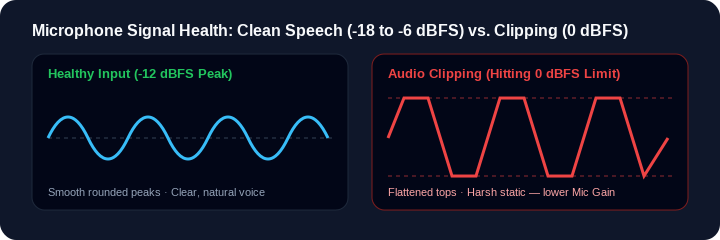
Understanding what is gain in audio prevents 90% of muddy, clipped, or hissy recordings. Use this quick comparison table:
| Audio Term | Stage in Signal Chain | What Changing It Does |
|---|---|---|
| Input Gain (Mic Gain) | Preamp input (before recording) | Amplifies capsule sensitivity; impacts noise floor, warmth & clipping |
| Volume (Output) | Playback / speakers / headphones | Changes listening loudness only; does not alter recording distortion |
| Mic Level (-60 to -40 dBu) | Raw microphone output | Extremely weak signal requiring a mic preamp |
| Line Input (+4 / -10 dBV) | Keyboards, mixers, phone jacks | Up to 1,000x stronger than mic level; too insensitive for raw mics |
Practice live gain staging: dial in -18 to -6 dBFS in Raw Studio Mode
Voice still too quiet? safely increase quiet microphone volume
2. Is a Mic Input or Output? (Plus Mic vs. Line Input)
A microphone is strictly an audio input device: its diaphragm turns acoustic voice pressure into voltage sent into your computer. Speakers and headphones are output devices.
When comparing mic vs line input ports on a PC or audio interface, always connect unamplified microphones to a dedicated Microphone Input (pink jack or XLR preamp) rather than a blue Line-In port, which expects a signal up to 1,000 times hotter.
3. How to Stop Mic Feedback Squeals Fast
Mic feedback is the high-pitched screeching loop created when speaker output re-enters your live microphone and amplifies infinitely.
- Wear closed-back headphones whenever monitoring your voice or joining group calls.
- Reduce speaker volume and lower excessive microphone gain.
- Aim the rear (null) side of a cardioid microphone directly at your desk speakers.
- Run our Echo Bleed Check to verify clean acoustic separation between speakers and mic.
Check background noise: measure your room noise floor in decibels
Inspect output balance: check desk speaker balance to minimize feedback
4. Reading a Microphone Frequency Response Graph
A microphone frequency response chart maps sensitivity across human hearing (20 Hz bass → 300 Hz–3 kHz vocal mids → 10–20 kHz treble air). A flat curve reproduces audio neutrally, while a mild +3 dB "presence boost" around 3–5 kHz makes spoken dialogue crisp and intelligible on calls.